Find the things
behind the numbers.
See agent data, worktrees and build output in one report. Explain a folder and find out what made it.
agentdisk explain <dir>YOUR AGENTS BUILD THINGS. THEY LEAVE THINGS, TOO.
Worktrees. Build folders. Another copy of node_modules. See what your agents left behind, what is really reclaimable, and what stays.
agentdisk scan -p ~/ProjectsLocal CLI + MCP server · Windows, macOS & Linux
Two rebuildable folders. Work stays protected.
The real CLI checks your disk and saves a plan. A person applies it in their own terminal.
Fictional report data. This illustration does not scan or clean your disk. agentdisk itself runs in your terminal.
SPACE TO THINK. SPACE TO BUILD.
Parallel agents are productive. Their extra worktrees and build folders add up. Get the context before deciding what to reclaim.
See agent data, worktrees and build output in one report. Explain a folder and find out what made it.
agentdisk explain <dir>Hardlinked files are counted once. “Reclaimable” counts the bytes that would actually come back.
agentdisk size <dir>Review a plan, move items to quarantine yourself, and restore them if you change your mind.
agentdisk plan -p ~/ProjectsNOTHING MOVES UNTIL YOU DECIDE
scanA read-only report. Nothing on disk changes.
planSaves the proposed cleanup. Moves nothing.
applyYou confirm in your terminal. Eligible items move to quarantine.
restorePut quarantined items back. Deletion is a separate, later step.
AI agents can inspect and plan. Moving or deleting files stays with the person at the terminal.
THE TOOL, IN ITS NATURAL HABITAT
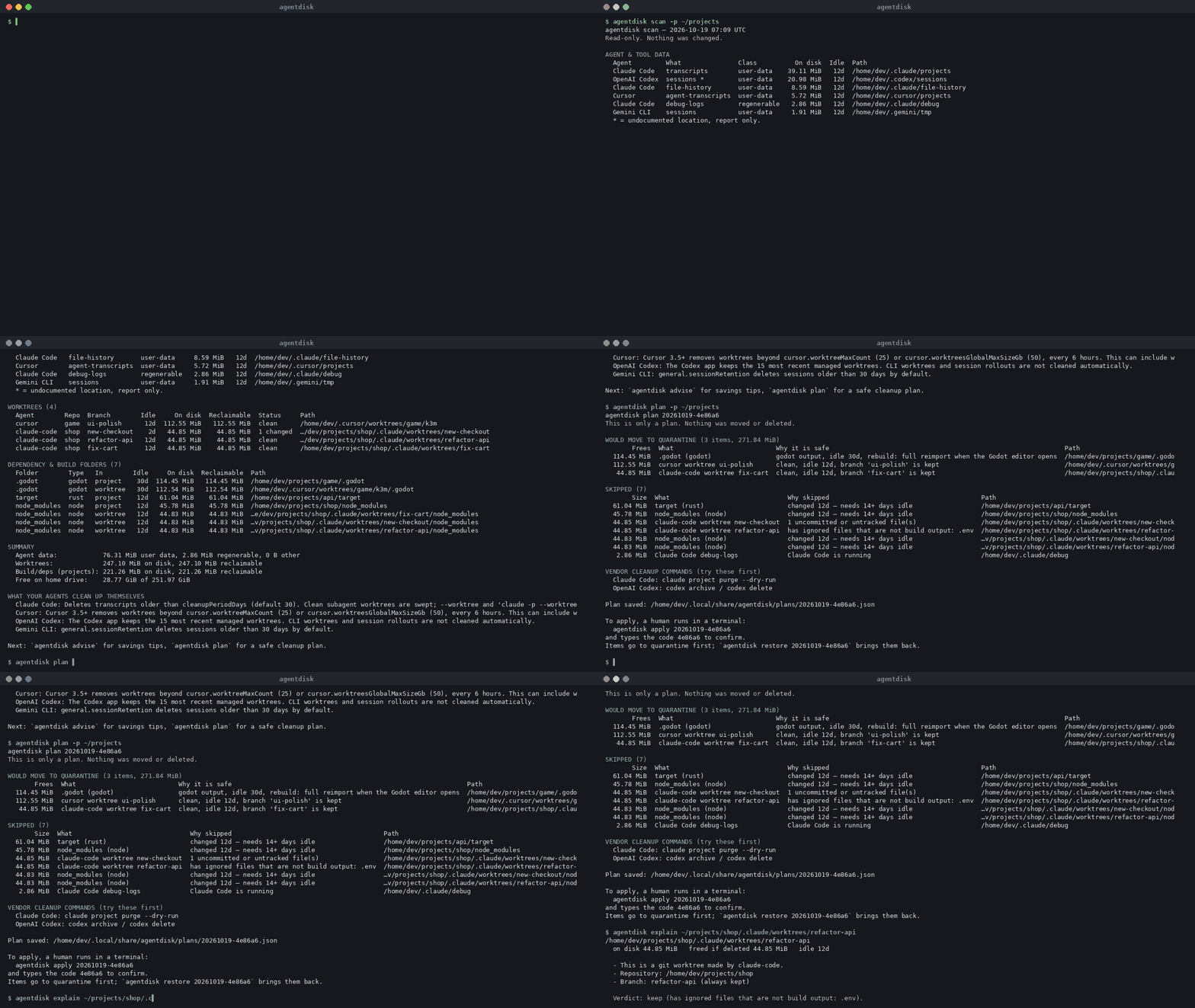
See the CLI scan sample projects, make a plan, and explain why a worktree with a .env file is kept.
SOME THINGS DESERVE TO STAY
A big folder is not automatically disposable. agentdisk checks context and keeps your work out of the plan.
Read the cleanup rulesDirty or untracked worktrees, local .env files, locks and commits on no branch are kept out of cleanup plans.
Transcripts, checkpoints, memories and settings are reported, never planned.
Models and SDK downloads stay. Active editors and running agents affect what is eligible.
ONE SMALL BINARY. A LITTLE MORE BREATHING ROOM.
Download a release for your platform, unpack it and add agentdisk to your PATH. Checksums are in SHA256SUMS.txt.
Install the release binary first, then check it and scan your projects folder.
Download for Windows, macOS or Linuxagentdisk --version
agentdisk scan -p ~/ProjectsBEFORE YOU GET STARTED
No. Scans do not write, and a plan moves nothing. Applying a plan requires a person at a terminal and moves items to quarantine. Purging is a separate, later confirmation.
agentdisk is a CLI and MCP server. The interactive report on this website is an illustration with fictional data. The real tool runs in your terminal.
No. MCP tools can inspect and create a plan; applying it is for you in your own terminal. There are no MCP tools to move or delete files.
No. agentdisk runs locally and has no network code. Your files and reports stay on your machine.
Hardlinked bytes are counted once. Copy-on-write clones such as APFS clones, ReFS block clones and Btrfs reflinks still count as separate space.
Windows refuses moves of open folders, Linux checks open files, and macOS relies on idle time and editor detection. Storage paths also change between agent versions; agentdisk adapters shows what was found.
Yes. Agent knowledge lives in small TOML adapter files. See the adapter guide and open issues.
MIT or Apache-2.0, at your choice. agentdisk is open source and made by laaielichter.

LESS LEFT BEHIND. MORE ROOM AHEAD.
Understand the clutter. Keep the work. Start with a scan.
Find it useful? A GitHub star is always welcome.